WholesaleConnect CRM
WholesaleConnect CRM is a specialized B2B Customer Relationship Management solution engineered to empower wholesale distributors with advanced tools for managing client relationships, streamlining sales processes, and optimizing order fulfillment. It provides a centralized hub for all customer interactions, sales pipeline activities, and critical product information, designed to enhance efficiency and drive revenue growth in the competitive distribution landscape.
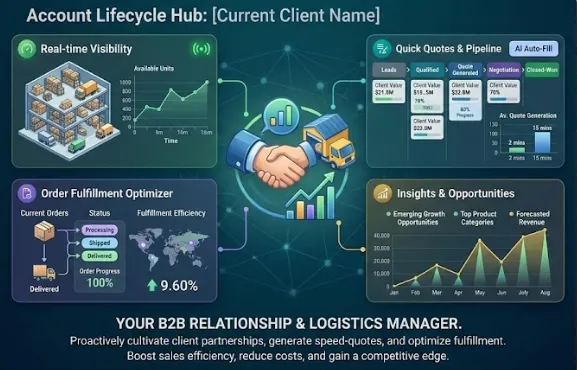
About this project
Key capabilities
Advanced Client & Account Management
A centralized, 360-degree view of every B2B client, encompassing detailed company profiles, hierarchical contact management, comprehensive purchase histories, and exhaustive communication logs.
Business Value
Significantly enhances client retention and loyalty by enabling personalized and informed interactions. It improves cross-functional collaboration, reduces onboarding time for new sales reps, and provides strategic insights for targeted marketing and upselling efforts, ultimately boosting lifetime customer value.
Streamlined Order & Quote Management
An intuitive workflow for generating accurate sales quotes and converting them seamlessly into orders, fully integrated with real-time inventory and custom pricing rules.
Business Value
Shortens sales cycles, improves customer satisfaction through rapid and accurate responses, minimizes costly order entry errors, and optimizes inventory management by providing sales teams with accurate stock data, ultimately increasing sales velocity and revenue.
Dynamic Sales Pipeline & Opportunity Tracking
Visual, customizable sales pipeline management allowing reps to track leads, monitor opportunity progression, and forecast revenue with high accuracy.
Business Value
Improves lead conversion rates, enhances revenue forecasting accuracy, allows for proactive management of the sales team's workload, and facilitates data-driven coaching and performance management for sales managers, leading to increased overall sales.
Comprehensive Analytics & Reporting
Customizable dashboards and in-depth reports providing actionable insights into sales performance, customer purchasing trends, and operational efficiency.
Business Value
Improves strategic planning, facilitates targeted sales strategies, optimizes product offerings, enhances sales team performance through data-driven coaching, and ultimately drives sustainable business growth and profitability.
Core Screens & Workflow
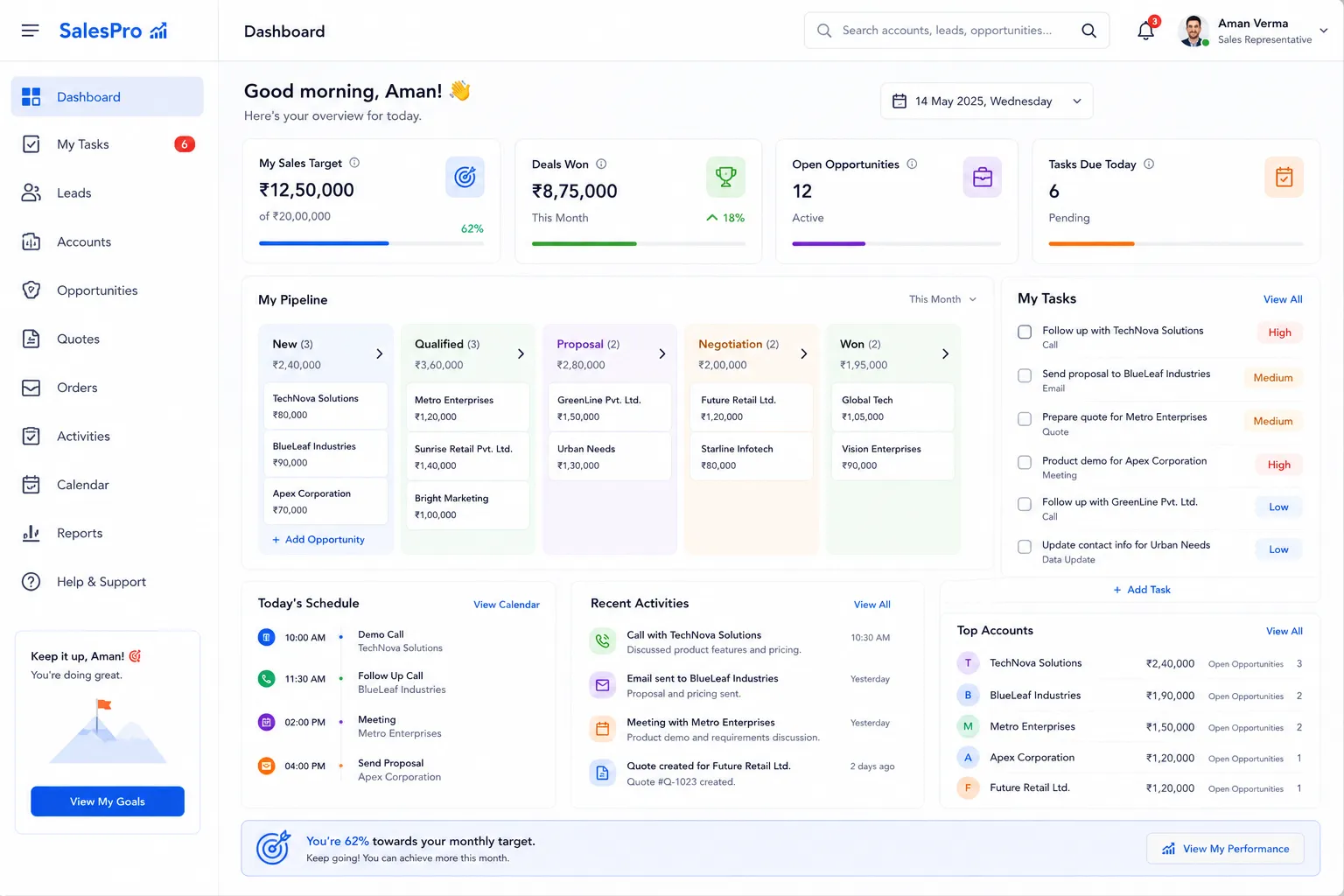
Frontend User Panel - Sales Representative Dashboard
A personalized, interactive dashboard serving as the primary control center for sales representatives, offering an at-a-glance view of daily activities, key performance indicators, and immediate priorities.
Workflow
Upon successful login, a sales representative is immediately presented with a consolidated overview designed to optimize their daily workflow. This screen dynamically displays crucial information such as their progress against sales quotas, a list of urgent tasks and follow-ups, recently updated client activities, and a summary of active opportunities requiring attention. Interactive widgets allow reps to quickly drill down into specific accounts, opportunities, or scheduled meetings directly from the dashboard.
Capabilities
View personal sales targets and real-time progress, manage daily task lists and follow-up reminders, access an activity feed for assigned clients, quick links to active quotes and orders, visualize sales pipeline stages, and monitor individual performance metrics.
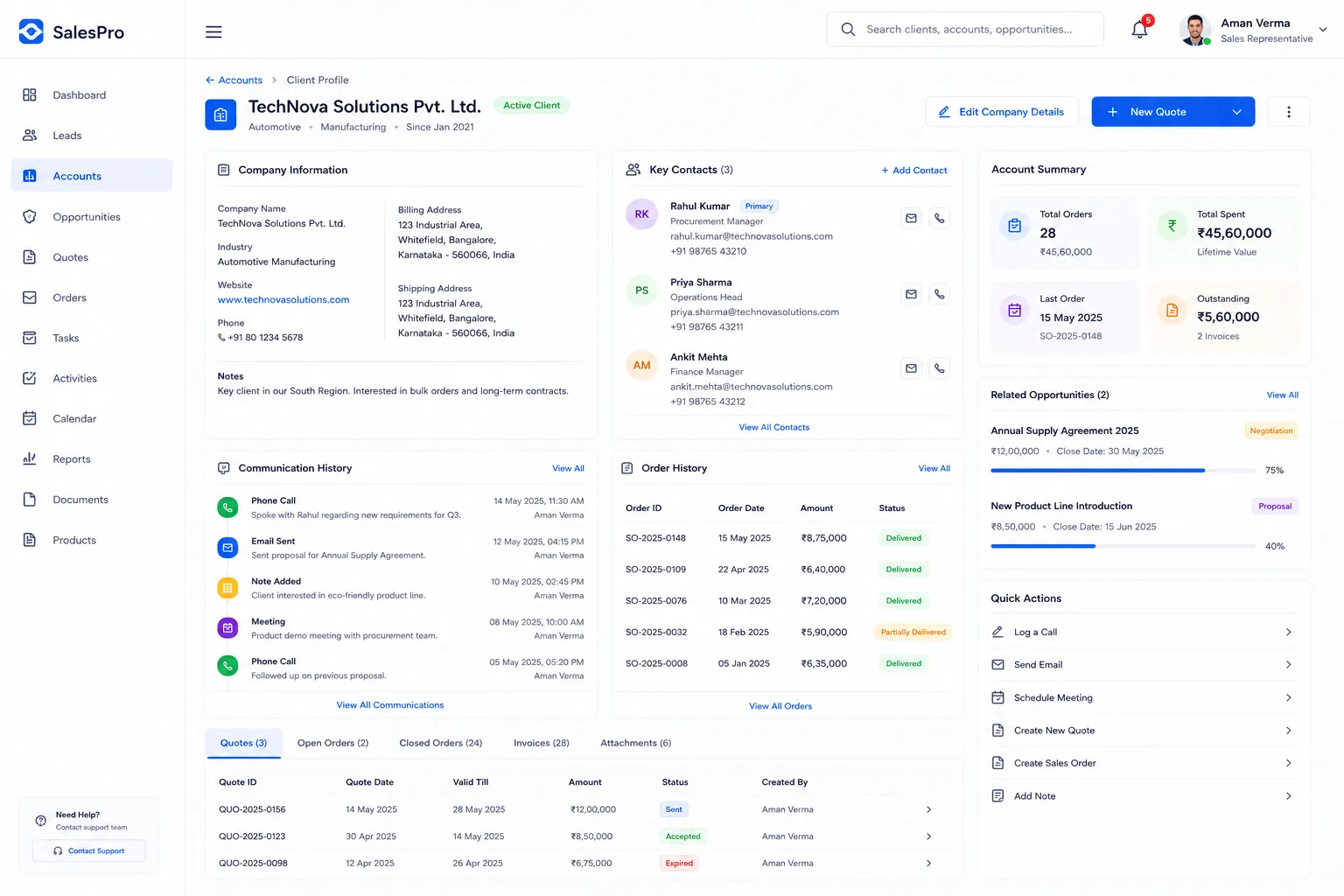
Frontend User Panel - Client Account Profile
A comprehensive 360-degree view for managing individual B2B client accounts, providing detailed company information, multi-contact management, full communication history, and complete order transaction records.
Workflow
Sales representatives can search for and select any client account to access a deep-dive profile. This screen consolidates all relevant information about a client, including their primary contacts, associated company hierarchy, a chronological log of all communications (calls, emails, notes), and a complete history of past purchases, quotes, and orders. Reps can update company details, add new contacts, log new interactions, or initiate new sales processes directly from this central hub.
Capabilities
View and edit company details (address, industry, notes), manage multiple client contacts with specific roles, review a complete chronological communication log, access full purchase and order history, create new quotes or sales orders for the client, track ongoing opportunities related to the account.
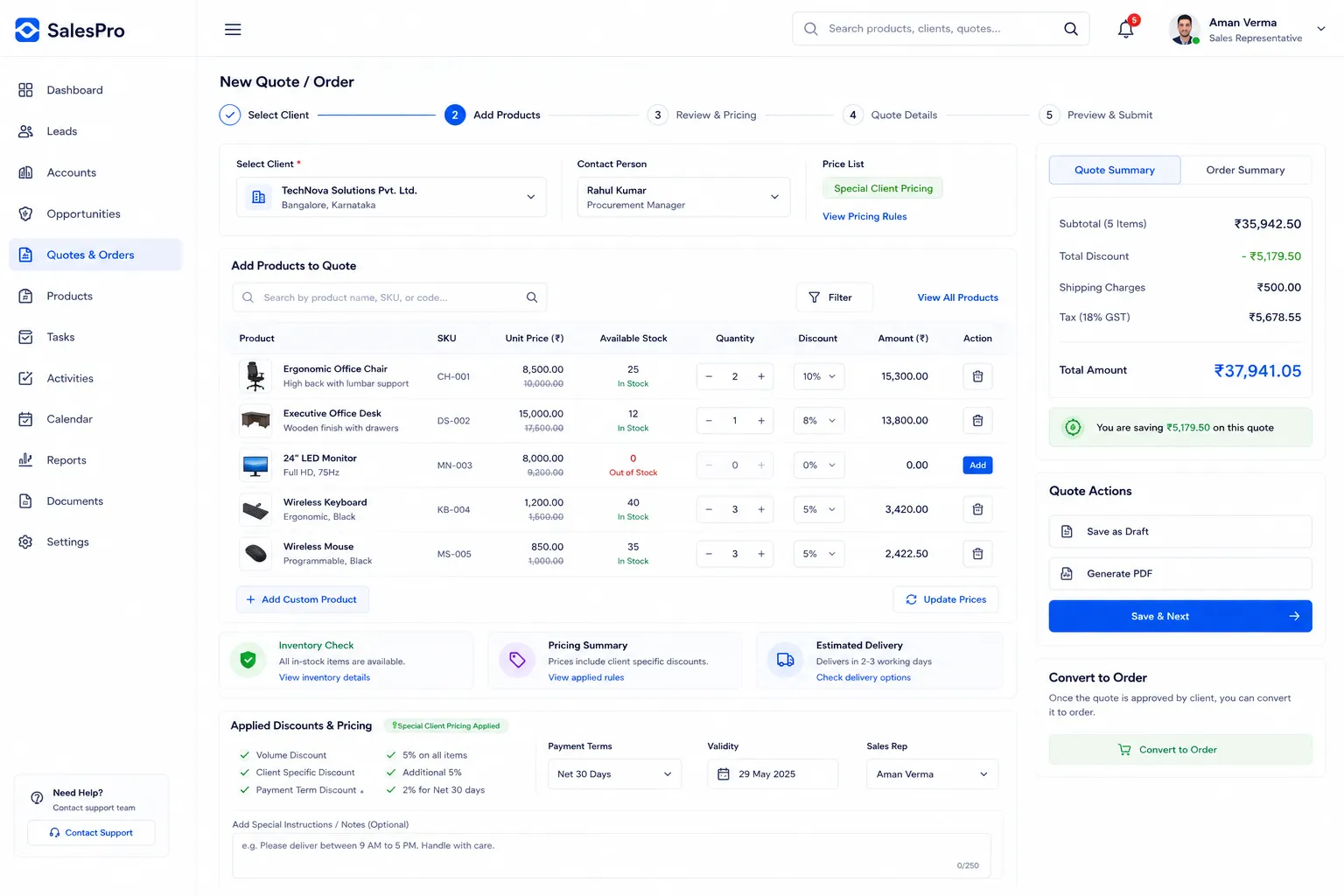
Frontend User Panel - New Order & Quote Generation
An intuitive, step-by-step interface for sales representatives to efficiently generate detailed sales quotes and seamlessly convert them into confirmed sales orders, fully integrating with product catalog, custom pricing, and real-time inventory checks.
Workflow
This guided workflow empowers sales reps to select a client and then browse the extensive product catalog to add specific items to a quote. As products are added, the system automatically applies pre-configured pricing rules, including negotiated rates or volume-based discounts. Crucially, real-time inventory status is displayed, preventing the accidental commitment to out-of-stock items. Once the quote is finalized and approved by the client, it can be converted into a sales order with a single click, automatically generating all necessary documentation and triggering fulfillment processes.
Capabilities
Select and add products from a searchable catalog, apply client-specific pricing and discounts, view real-time product availability and stock levels, generate professional PDF quotes, directly convert approved quotes into sales orders, specify shipping details, manage payment terms, and add special instructions.
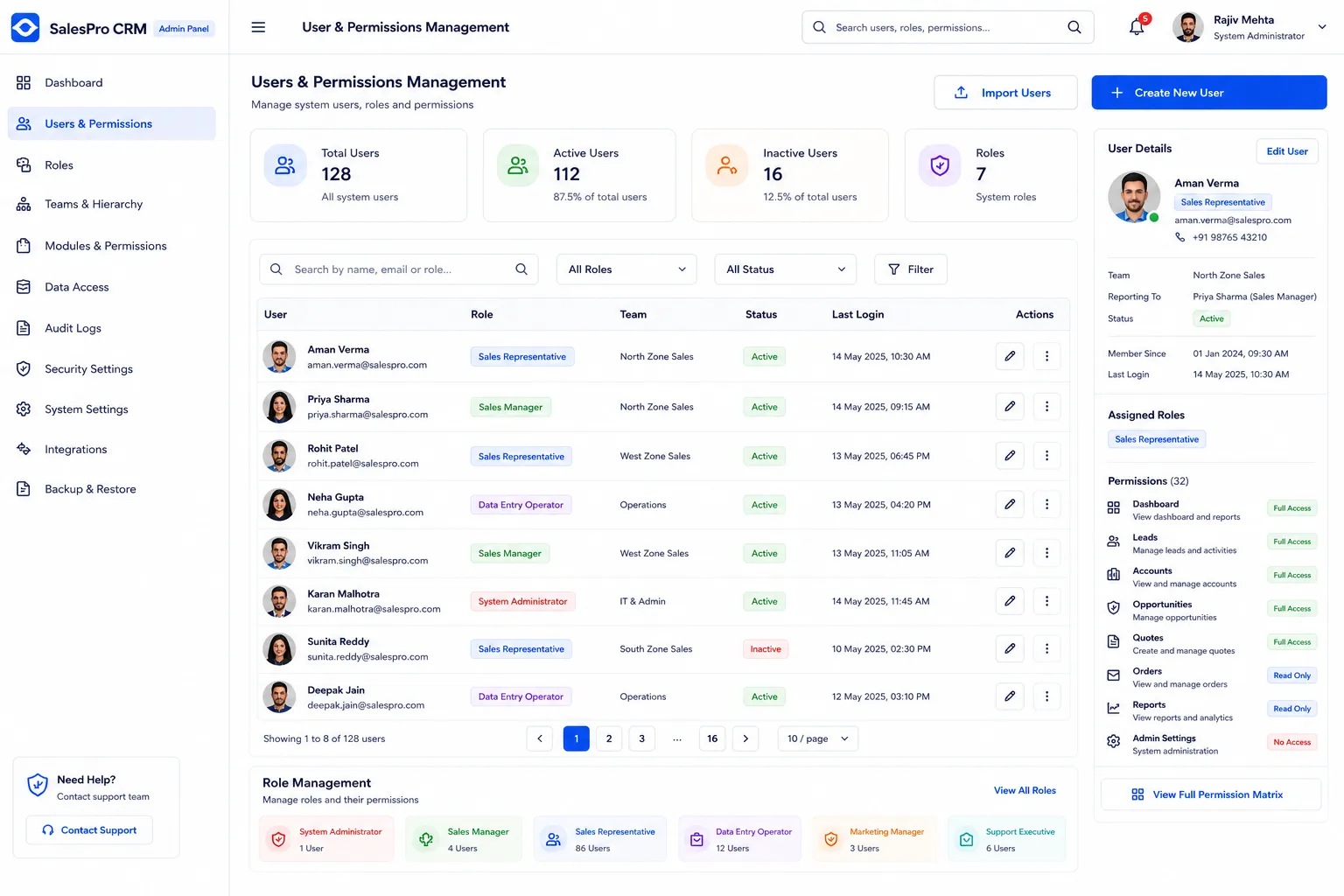
Admin Panel - User & Permissions Management
A robust administrative interface designed for securely managing all system users, meticulously defining roles, assigning granular permissions, and overseeing the organizational structure of sales teams and other departments.
Workflow
System administrators utilize this screen to create new user accounts, assign specific roles (e.g., Sales Representative, Sales Manager, Data Entry, System Administrator) with predefined permission sets, and fine-tune individual permissions for accessing various modules, data sets, and functionalities within the CRM. It ensures that each user has precisely the access required for their role, no more and no less. Admins can also deactivate accounts, reset passwords, and audit user activity.
Capabilities
Create, edit, and deactivate user accounts, assign predefined or custom roles, set granular permissions for modules and data access, reset user passwords, manage team hierarchies and reporting structures, view detailed user activity logs for auditing and compliance purposes.
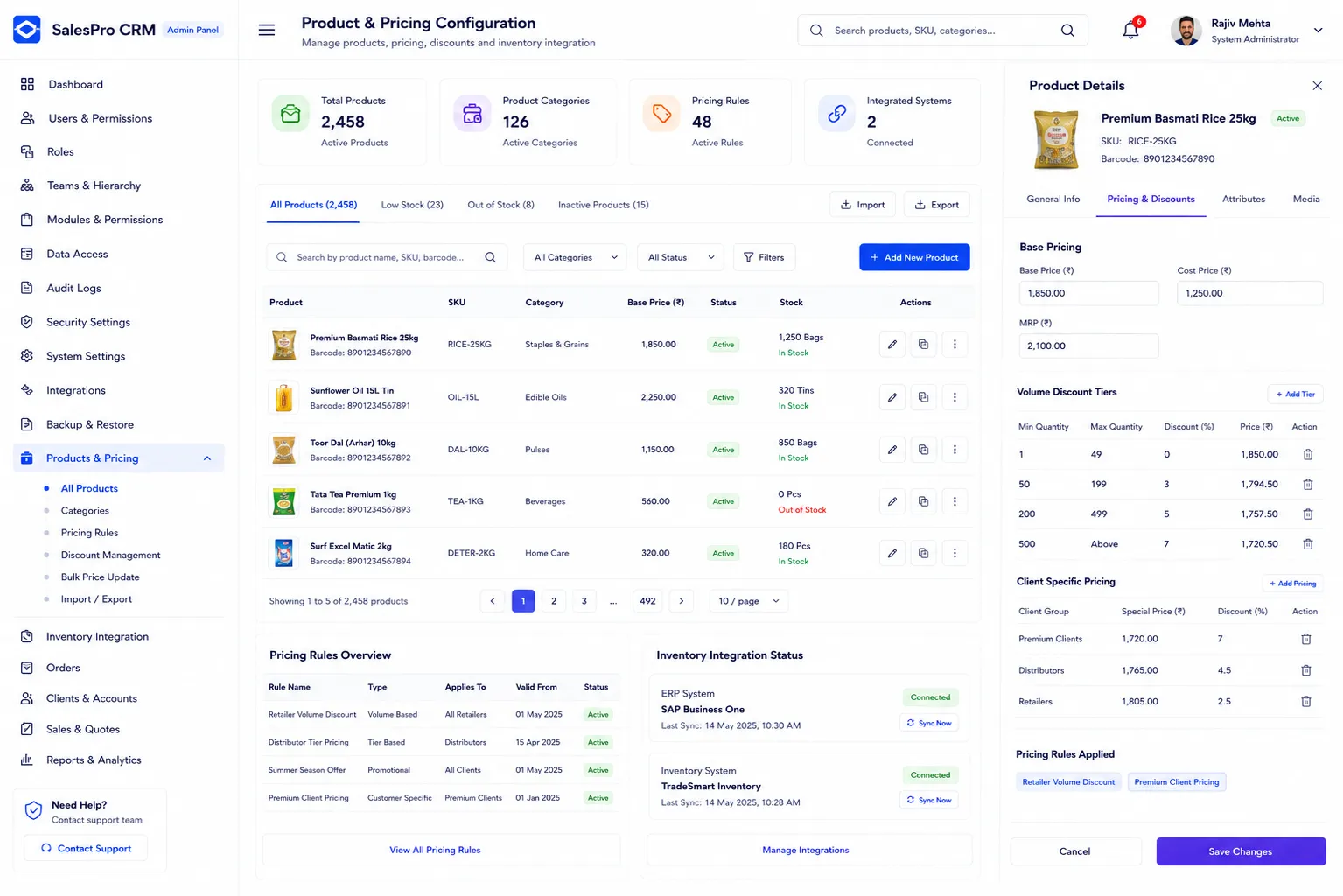
Admin Panel - Product & Pricing Configuration
A centralized administrative screen for comprehensively managing the entire product catalog, establishing complex pricing rules, configuring volume discounts, and linking product data to external inventory management systems.
Workflow
Administrators use this powerful interface to add new products, update existing product details (e.g., descriptions, images, SKUs, categories), configure base prices, and establish various pricing tiers or discount matrices based on client segments, order volumes, or promotional periods. Direct integration capabilities with an ERP or dedicated inventory system ensure that product availability and pricing information remain consistent and accurate across all sales channels and customer interactions.
Capabilities
Add, edit, and delete products, manage product categories and attributes, configure base and tiered pricing, define volume-based discounts, set up client-specific negotiated pricing, upload and manage product media (images, specifications), and manage integration points with external inventory systems.
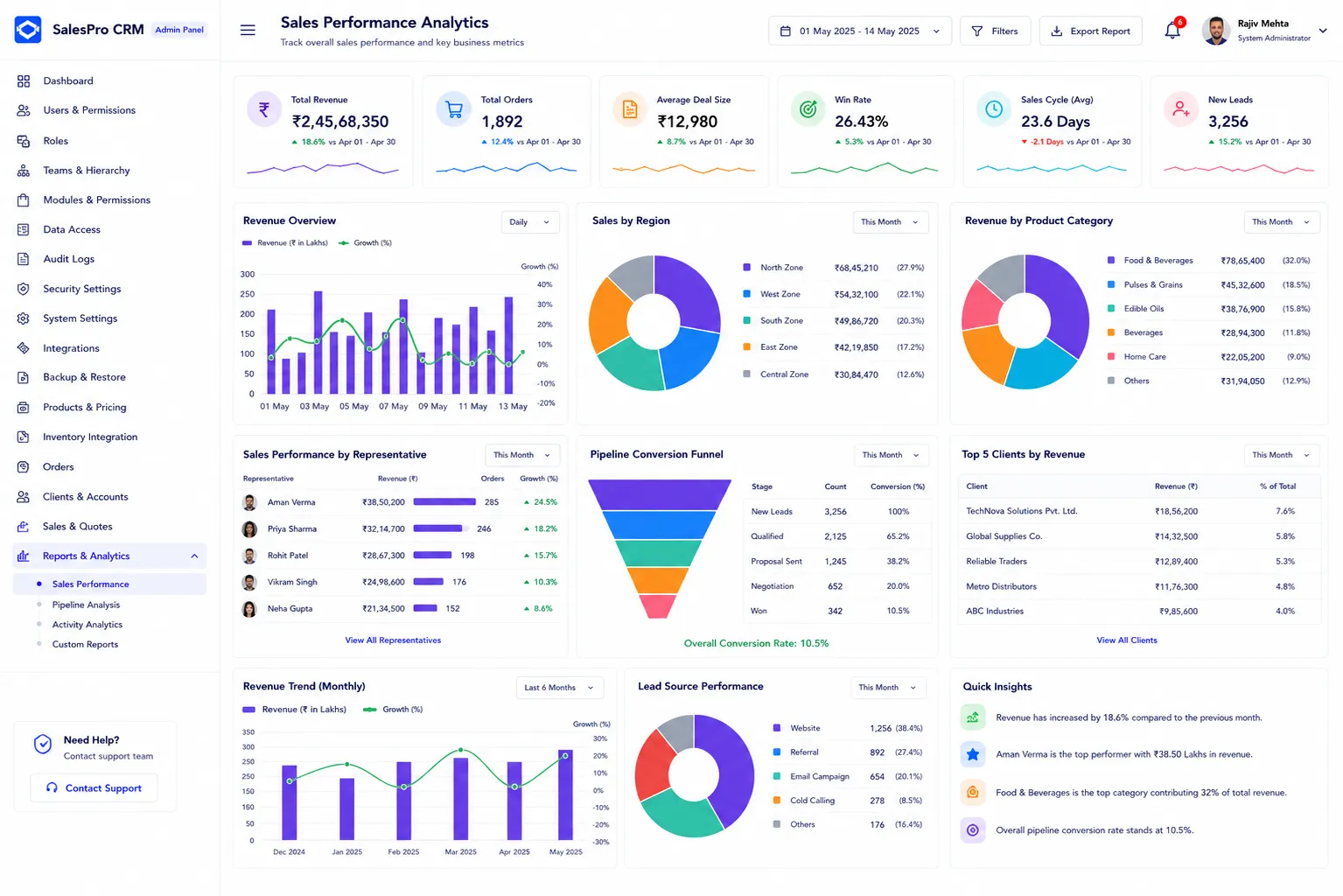
Admin Panel - Sales Performance Analytics
A high-level, comprehensive dashboard providing administrators and sales managers with deep, actionable insights into overall sales performance, team productivity, and key business metrics across the entire wholesale distribution network.
Workflow
This screen aggregates and synthesizes vast amounts of data collected from all sales activities, client interactions, order processing, and opportunity tracking modules. It presents this information through visually engaging charts, graphs, and customizable reports detailing sales trends, lead conversion rates, revenue breakdown by product, region, or sales representative, and overall team performance. The interactive nature allows for drill-downs into specific metrics or timeframes to uncover granular details.
Capabilities
View overall sales revenue and growth trends, track lead conversion rates across the pipeline, analyze sales performance by specific regions, product categories, or individual sales representatives, monitor average deal size and sales cycle length, generate custom reports for strategic analysis, and identify top-performing products and most valuable client accounts.
Technologies used
Have a project in mind?
Let's build something powerful together.